You won the bid. The subcontract arrives. It's 47 pages of dense legal language, and they want it signed by Friday.
Sound familiar?
Most subs sign contracts they haven't fully read because they don't have time—or a system—to review them efficiently. That's how you end up bound to terms that eat your profit.
Here's a fast workflow to catch the worst clauses before you sign.
Why Contract Review Gets Skipped
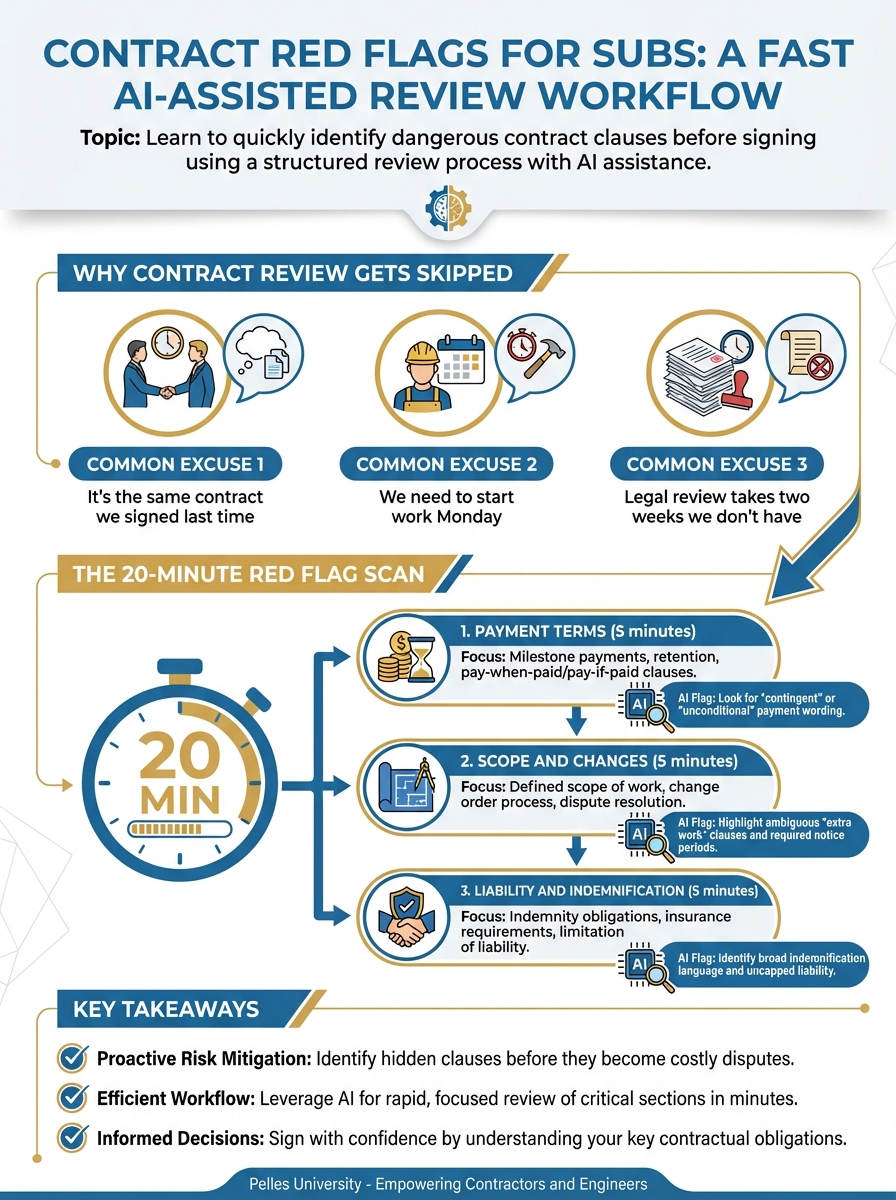
The reasons are always the same:
- "It's the same contract we signed last time"
- "We need to start work Monday"
- "Legal review takes two weeks we don't have"
- "It's a standard AIA form—should be fine"
None of these are good reasons. Contracts change between projects. "Standard" forms get modified. And the clause that costs you $50,000 doesn't care about your schedule.
The 20-Minute Red Flag Scan
You don't need to read every word to catch major problems. Focus on these sections:
1. Payment Terms (5 minutes)
Look for:
- Pay-when-paid vs. pay-if-paid language
- Retainage percentage and release conditions
- Payment timing after invoice submission
- Lien waiver requirements before payment
- Right to offset against other projects
Red flag: "Contractor shall pay Subcontractor within 7 days of receipt of payment from Owner." (Pay-if-paid—if the owner doesn't pay, neither do you.)
Yellow flag: Retainage above 5% or release conditions tied to project final completion.
2. Scope and Changes (5 minutes)
Look for:
- How changes are defined
- Who can authorize changes
- Pricing for change orders (markup limits?)
- Dispute resolution for scope disagreements
- Time limits for submitting change requests
Red flag: "No additional compensation for any work that can be reasonably inferred from the Contract Documents." (Scope creep language—anything not explicitly excluded is arguably included.)
Yellow flag: Short time limits for change requests (7 days or less).
3. Liability and Indemnification (5 minutes)
Look for:
- Indemnification scope (your negligence only? or anyone's?)
- Limitation of liability caps
- Insurance requirements beyond standard coverage
- Consequential damages waiver (or lack thereof)
- Warranty terms beyond specs
Red flag: Indemnification for the sole negligence of others. (You're paying for their mistakes.)
Yellow flag: Consequential damages not waived. (Opens you to project delay claims.)
4. Schedule and Delays (5 minutes)
Look for:
- Liquidated damages flow-down
- Acceleration rights
- Notice requirements for delays
- Force majeure terms
- Right to terminate for delay
Red flag: "Subcontractor shall accelerate work at no additional cost to maintain schedule." (Overtime without pay.)
Yellow flag: Liquidated damages apply to subcontractor delay regardless of GC delay.
Using AI for Contract Scanning
AI can dramatically speed up initial review. Use this prompt:
Review this subcontract and identify potential red flags in these categories:

1. PAYMENT
- Pay-when-paid vs pay-if-paid language
- Unusual retainage terms
- Offset or back-charge rights

2. SCOPE
- Broad inclusion language ("reasonably inferred")
- Change order limitations
- Short notice periods

3. LIABILITY
- Indemnification beyond your negligence
- Missing limitation of liability
- Consequential damages exposure

4. SCHEDULE
- Liquidated damages flow-down
- Acceleration without compensation
- Unreasonable delay notice periods

For each red flag found:
- Quote the specific language
- Explain the risk
- Suggest negotiation approach
The AI output is your starting point. A human still needs to evaluate whether each flag matters for this specific project.
Building Your Redline Response
When you find issues, you have three options:
Option 1: Strike and Initial
Cross out the problematic language, write your revision, initial and date. Send back with a note: "Contract executed with modifications as marked."
Best for: Minor issues, reasonable GCs, relationships you value.
Option 2: Formal Redline
Mark up the contract in Word or PDF with proposed changes. Include a summary letter explaining your requested modifications.
Best for: Multiple issues, larger projects, GCs you don't know well.
Option 3: Exception Letter
Sign the contract as-is, but attach a letter documenting specific exceptions you're taking.
Best for: When you can't negotiate but need to document your position.
The Contract Review Checklist
Use this for every contract:
Payment:
- Payment timing defined (net 30 or better?)
- Retainage reasonable (5% or less?)
- Retainage release tied to your completion, not project completion?
- No cross-project offset rights?
Scope:
- Scope limited to contract documents (no "reasonably inferred")?
- Change order process defined?
- Reasonable time for change requests (14+ days)?
Liability:
- Indemnification limited to your negligence?
- Limitation of liability included?
- Consequential damages waived mutually?
Schedule:
- Liquidated damages reasonable or negotiated?
- Acceleration requires mutual agreement?
- Delay notice requirements achievable?
Insurance:
- Requirements match your current coverage?
- Additional insured requirements standard?
- Waiver of subrogation mutual?
Common Negotiation Approaches
"We'll sign if you remove X" – Direct, works with reasonable GCs.
"Our insurance doesn't cover X—here's what we can provide" – Positions it as practical, not adversarial.
"This language exceeds owner requirements" – Useful when GC is adding terms beyond the prime contract.
"Industry standard is Y—can we align?" – References norms without being confrontational.
What's Next
A quick scan catches the worst problems. The next step is building contract templates for negotiation—standard redline language for common issues that your team can apply consistently across projects.
TL;DR
- Most subs sign contracts they haven't fully read—that's how bad terms become your problem
- Focus your 20-minute scan on payment, scope, liability, and schedule sections
- Use AI to accelerate identification of red flag language, then human-review the findings
- Build a redline response: strike and initial, formal markup, or exception letter
- A signed contract with documented exceptions beats an unsigned contract you can't negotiate