Your best estimator retires next year. Thirty years of "I remember when we did that hospital project" walks out the door.
Every company has this problem. Experience lives in people's heads, not in systems. When people leave, knowledge leaves with them.
Here's how to capture that knowledge without creating a new paperwork burden.
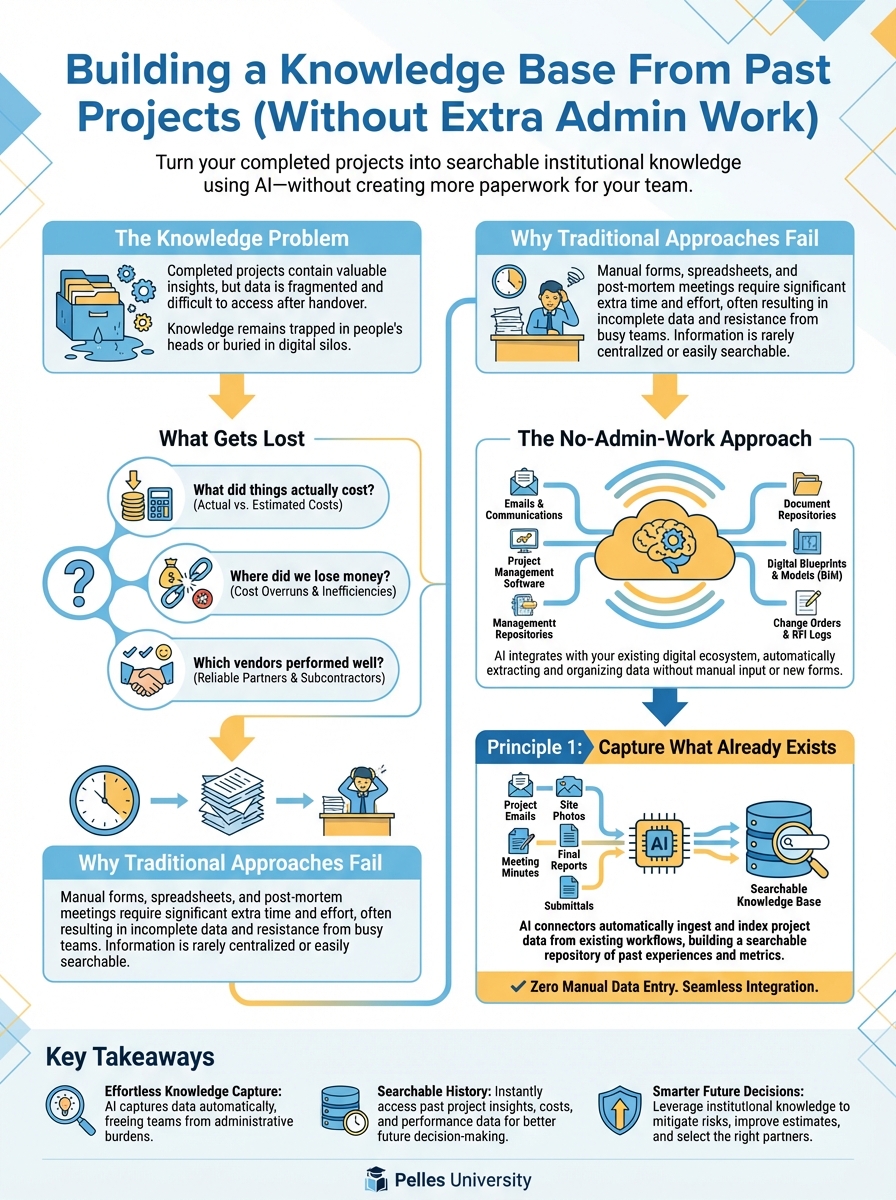
The Knowledge Problem
What Gets Lost
When projects end, valuable information scatters:
Pricing intelligence:
- What did things actually cost?
- Where did we lose money?
- Which vendors performed well?
Technical lessons:
- What installation challenges did we hit?
- What coordination issues arose?
- What specs caused problems?
Relationship history:
- Which GCs are good to work with?
- Which architects are reasonable?
- Who's difficult on changes?
Project-specific context:
- Why did we make that decision?
- What was the workaround for that problem?
- What would we do differently?
Why Traditional Approaches Fail
"Fill out this lessons learned form" Nobody does it. It's extra work with no immediate benefit.
"Write a project closeout report" Takes hours. Sits in a folder. Never gets read.
"Update the knowledge base" What knowledge base? Who maintains it? How do you find things?
The solution has to work with how people already operate, not require new behaviors.
The No-Admin-Work Approach
Principle 1: Capture What Already Exists
Don't create new documentation. Extract knowledge from existing documents:
- Emails
- RFI logs
- Change order files
- Meeting minutes
- Daily reports
The information is already there. You just need to make it findable.
Principle 2: Extract, Don't Write
Use AI to pull insights from documents rather than asking humans to write summaries:
Instead of: "Write a lessons learned report" Use: "Analyze these project files and extract key lessons"
The AI reads. Humans review and correct.
Principle 3: Ask Questions, Get Answers
A knowledge base is only useful if you can query it:
Useless: A folder of PDFs nobody searches Useful: "What problems did we have with VAV boxes on past hospital projects?"
Searchable knowledge beats organized files.
Building the System
Step 1: Collect Project Documentation
At project close, gather:
Core documents:
- Final budget vs. actual
- Change order log with final status
- RFI log with responses
- Punch list and resolution
- As-built drawings
Communication:
- Key email threads (saved to project folder)
- Meeting minutes (especially coordination and owner meetings)
- Internal project notes
Evaluations:
- Subcontractor performance notes
- GC relationship notes
- Vendor performance notes
This collection should already be happening for closeout. No new work.
Step 2: AI-Assisted Extraction
Run the collected documents through AI extraction:
Review this project documentation and extract:

1. Cost Performance
   - Budget vs. actual by major category
   - Significant overruns and causes
   - Significant savings and why

2. Change Orders
   - Total change order value
   - Major changes and causes
   - Recovery rate (submitted vs. approved)
   - Lessons for future bids

3. Technical Challenges
   - Installation problems encountered
   - Coordination issues
   - Spec interpretation problems
   - Solutions that worked

4. Relationships
   - GC: how were they to work with?
   - Architect/Engineer: responsive? Reasonable on changes?
   - Other subs: coordination quality?

5. Key Lessons
   - What would we do differently?
   - What worked well to repeat?
   - What should we watch for on similar projects?

Format as a searchable project summary.
Step 3: Human Review
AI extraction isn't perfect. Have someone who worked on the project review:
- Correct errors
- Add context the documents don't capture
- Flag confidential items
- Confirm key lessons
This takes 30 minutes, not hours of writing from scratch.
Step 4: Standardized Storage
Store project summaries in a consistent format:
Project Knowledge Base/
├── Healthcare/
│   ├── ABC-Hospital-2024.md
│   └── XYZ-Medical-2023.md
├── Office/
│   ├── 123-Main-Tower-2024.md
│   └── Downtown-Office-2023.md
└── Industrial/
    └── Manufacturing-Plant-2024.md
Each file follows the same structure. Easy to search.
Step 5: Enable Querying
Make the knowledge base searchable:
Search the project knowledge base for:
"What coordination issues did we have with fire protection contractors?"

Return:
- Project name
- Issue description
- Resolution
- Lesson learned
AI can search across all project files and return relevant answers.
What to Capture
Cost Intelligence
For future estimating:
- Actual costs vs. bid by CSI division
- Labor productivity (hours/unit)
- Material cost trends
- Subcontractor pricing patterns
Example entry:
Project: ABC Hospital (2024)
Ductwork:
- Bid: $485,000
- Actual: $512,000
- Variance: +5.6%
- Cause: Specification required higher gauge than standard
- Lesson: Check spec carefully for non-standard material requirements
Technical Lessons
For future installation:
- Equipment access challenges
- Coordination conflicts
- Code interpretation issues
- Startup problems
Example entry:
Project: ABC Hospital (2024)
AHU Installation:
- Issue: AHU wouldn't fit through mechanical room door as planned
- Resolution: Removed unit from skid, rigged in pieces, reassembled on-site
- Extra cost: $8,500 in rigging and labor
- Lesson: Verify equipment access route during bid phase, not after award
Relationship Notes
For future bid decisions:
- GC payment practices
- Architect reasonableness
- Owner change management
- Inspector thoroughness
Example entry:
GC: Smith Construction
Projects: ABC Hospital (2024), XYZ Office (2023)
Payment: Slow (45-60 days typical)
Change management: Very difficult, expect 40-50% recovery
Coordination: Good weekly meetings, reasonable on schedule issues
Bid again? Yes, but price changes conservatively
Process Improvements
For future operations:
- What workflows worked
- What tools helped
- What processes failed
- What to change
Example entry:
Process: Submittal preparation
What worked: Using AI to extract submittal register from specs
Time saved: 60% reduction in register prep time
What to improve: Need to verify AI output against addenda
Recommendation: Add addendum check step to submittal SOP
Making It Useful
Query Patterns
Train your team to query the knowledge base:
Before bidding: "What lessons do we have from past [building type] projects?"
During buyout: "What vendors performed well on similar projects?"
During execution: "What problems have we seen with [equipment type] installation?"
During closeout: "What should we document from this project?"
Regular Updates
Build knowledge capture into existing rhythms:
Project closeout: 30-minute extraction and review Quarterly: Review and organize new entries Annually: Clean up outdated information
Onboarding Use
New employees review relevant project histories:
- Estimators read bidding lessons
- PMs read execution lessons
- Field supervisors read technical lessons
Accelerates learning from company experience.
Avoiding Common Failures
Failure 1: Too Much Detail
Don't capture everything. Capture what's actionable.
Too detailed: "On January 15th, we had a coordination meeting where..." Actionable: "Coordinate with fire protection early—we had three reroutes due to sprinkler conflicts"
Failure 2: No Maintenance
A knowledge base that's never updated becomes useless.
Solution: Assign ownership. Schedule reviews. Delete outdated entries.
Failure 3: Not Searchable
If people can't find it, they won't use it.
Solution: Consistent structure. AI-enabled search. Short, scannable entries.
Failure 4: No Accountability
If nobody's responsible, nothing happens.
Solution: Assign project closeout knowledge capture to the PM. Make it part of closeout checklist.
Starting Small
Don't try to capture 10 years of history at once:
Month 1: One Project
Pick a recently completed project. Run the extraction. Review and refine the process.
Month 2: Current Closures
Apply to all projects closing this month. Refine templates.
Month 3: Establish Rhythm
Build into standard closeout process. Train team.
Ongoing: Gradual Backfill
As time permits, extract from important past projects. Don't rush.
What's Next
A project knowledge base captures lessons. The next step is governance—making sure AI use across your company is consistent, compliant, and sustainable.
TL;DR
- Knowledge lives in people's heads and leaves when they leave
- Don't create new paperwork—extract insights from documents that already exist
- Use AI to pull lessons from project files, then have humans review
- Store in consistent format with searchable structure
- Build into existing closeout process—30 minutes per project, not hours